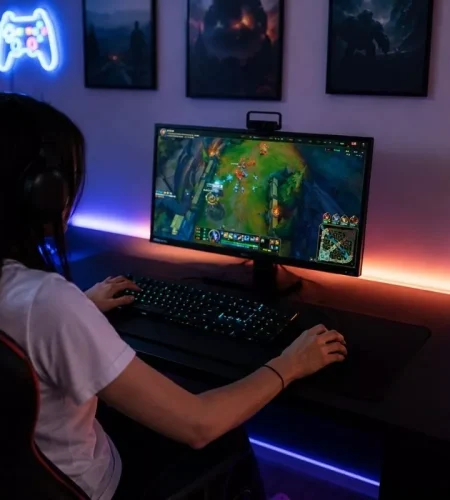
Gaming rooms tend to follow a familiar formula: blackout curtains, dark walls, RGB lighting, several monitors, and as little daylight as possible. It can look impressive, particularly when the screens and lighting are the visual focus.
But a room designed for long gaming sessions still has to function as a room. Poor ventilation, permanent darkness, clutter, uncomfortable furniture, and neglected surfaces can make the space feel more like a cave than somewhere you actually enjoy spending time.
The best gaming rooms balance atmosphere with everyday comfort.
Give the Room an Off-Screen Mode
A gaming room should not feel exactly the same at 2 p.m. and midnight.
If blackout curtains stay closed permanently and RGB lighting provides most of the illumination, the room never really gets a daytime identity. Open curtains or blinds when you are not gaming and use natural light when it is available. For rooms without much daylight, provide enough general lighting to make cleaning, organizing, and spending time away from the monitor comfortable.
It also helps to have a clear way to transition out of gaming mode. Turn on regular room lighting, leave the desk for a while, and return to whatever normally marks downtime for you. Adults who already keep products from https://medterracbd.com/ as part of their personal wellness routine can keep that familiar ritual in the quieter part of the evening rather than allowing the gaming desk to become the setting for everything they do at home.
The room becomes much easier to live with when gaming is one of its modes rather than its permanent state.
Stop Making RGB Lighting Do All the Work
Decorative lighting creates atmosphere, but it does not necessarily provide good general illumination.
A few LED strips around a desk can leave large sections of the room poorly lit. That becomes especially obvious when you need to find a cable, clean underneath furniture, organize equipment, or use the space for something other than gaming.
Layer the lighting instead.
Use practical general lighting for the whole room, task lighting where it is useful, and decorative lighting for atmosphere. Being able to control them independently means you can create the dark gaming environment you want without committing the entire room to it.
Pay attention to placement too. Lights reflected in monitors or shining directly into your field of vision can quickly become distracting.
Let Fresh Air Into the Setup
Gaming equipment generates heat, and several hours of use can noticeably change the temperature of a small room.
A PC, multiple displays, speakers, chargers, consoles, and other electronics all contribute. Add a closed door and covered windows, and the room can become uncomfortable surprisingly quickly.
Do not block ventilation simply to make the setup look cleaner. Give computer intake and exhaust areas enough space, keep vents reasonably clean, and consider how air moves through the entire room.
Opening a window when conditions allow, using appropriate ventilation, or improving airflow can make a long session much more comfortable.
Clean the Floor Like Part of the Equipment
The floor underneath a gaming setup tends to disappear from attention.
Desk chairs move over it constantly, shoes bring in dirt, snacks produce crumbs, and dust accumulates underneath desks where cleaning is inconvenient. Hard flooring can gradually become dull or marked, particularly in rooms that see heavy use.
For larger gaming rooms, entertainment spaces, or dedicated gaming venues with hard floors, knowing the difference between a floor buffer or floor burnisher can help determine which type of equipment is appropriate for maintaining or restoring the surface. Buffing and burnishing serve different purposes, so the condition and type of flooring should guide the choice rather than treating the machines as interchangeable.
At home, the required equipment may be much simpler. The important thing is not allowing the area beneath the setup to become permanently inaccessible.
Keep Food and Drinks Under Control
Long sessions and snacks naturally end up together.
The problem starts when empty cans, cups, plates, wrappers, and food containers remain around the desk after the session ends. Besides making the room look cluttered, crumbs and spills can create much more unpleasant cleaning problems later.
Give drinks a stable location away from expensive electronics. A side table can be more practical than balancing a glass beside a keyboard.
Take dishes out when you finish playing rather than waiting until the desk has accumulated enough to justify a trip to the kitchen.
It is a small habit that dramatically changes how the room feels the next morning.
Make the Desk Easy to Clean
A spectacular desk covered with equipment can become surprisingly difficult to maintain.
If every surface is occupied by speakers, controllers, decorative objects, charging docks, microphones, cables, and collectibles, even wiping away dust becomes a project.
Leave some accessible surface area.
Use cable management to keep unnecessary wiring away from the floor and desk. Give controllers and headphones permanent storage positions. Equipment that needs regular cleaning should be reachable without dismantling the setup.
A room tends to stay cleaner when cleaning it requires five minutes instead of forty.
Do Something About the Cables
A gaming room can easily contain dozens of cables.
Monitor power, DisplayPort or HDMI connections, USB devices, speakers, Ethernet, chargers, lighting, microphones, webcams, and consoles can create a mess behind an otherwise beautiful setup.
Cable management is not purely cosmetic. Organized cables make equipment easier to replace, troubleshoot, and clean around.
Label connections that are difficult to identify, especially when several similar cables disappear behind the desk. Avoid creating bundles so permanent that changing one device requires undoing the entire setup.
A good cable system should make future changes easier, not merely hide today’s cables.
Give Yourself Somewhere Else to Sit
If the gaming chair is the only comfortable place in the room, every activity happens at the computer.
Where space allows, add another seating option. It could be a small sofa, armchair, beanbag, or simply a comfortable chair positioned away from the main screen.
That gives you somewhere to talk with friends, use your phone, read, or take a break without remaining in exactly the same posture and visual environment.
It also makes the gaming room more useful when other people are there. Not everyone visiting needs to sit beside the desk watching over your shoulder.
Don’t Cover Every Wall
Gaming collections can make a room personal, but every available surface does not need to display something.
Posters, shelves, figurines, framed artwork, acoustic panels, neon signs, and collectibles can all work individually. Filling every wall with all of them at once can make even a large room feel crowded.
Choose what deserves to be visible.
Rotating parts of a collection can keep the room interesting without requiring permanent display space for everything you own. Empty wall space can actually make the items you do display stand out more.
Let Your Gaming Identity Extend Beyond the Room
A gaming setup is only one part of how players express themselves online.
Your profile picture, banner, bio, and other profile elements can carry the same visual personality as your physical gaming space. A dark setup might pair naturally with a darker gaming avatar, while a colorful room could work with a brighter profile style.
If you are updating your online gaming identity alongside your setup, you can browse Discord PFPs or explore Gaming PFPs for ideas.
The same principle applies here as it does to room design: you do not need to fill every available space. A few elements that work together usually look better than a collection of unrelated designs.
Build a Room You Still Like When the PC Is Off
The simplest test of a gaming room is to turn everything off.
Without the monitors and decorative lighting, does the space still feel comfortable? Can you open the curtains, sit somewhere pleasant, find what you need, and move around without stepping over cables or yesterday’s snack wrappers?
If not, the setup may be optimized for screenshots rather than everyday life.
A gaming room can still be dark, dramatic, colorful, and unmistakably designed around gaming. It just needs enough light, air, cleanliness, organization, and comfort to function beyond the hours when a game is running.
The best setup should make you want to spend time there—not make you wonder when you last opened the curtains.
Related Resources
- Discord PFPs – Find a profile picture that fits your gaming identity.
- Gaming PFPs – Browse gaming-focused avatar ideas.
- Discord Bio Ideas – Create a profile bio that matches your online style.
- Discord Banners – Find banners that complement your gaming profile.
- Discord Profile Picture Size – Check the recommended dimensions before uploading a new avatar.
Comments