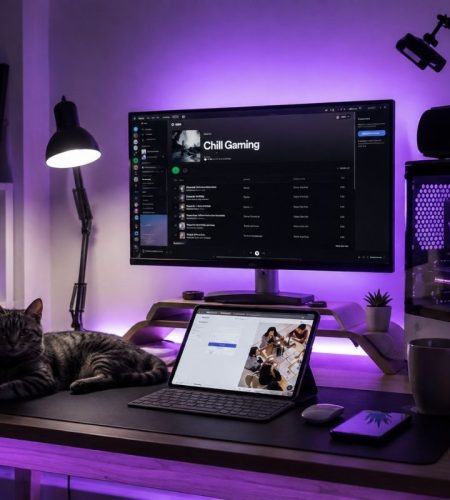
A gaming setup can look incredible in a photograph and still become uncomfortable after an hour. RGB lighting, an ultrawide monitor, and a powerful PC do not help much when your shoulders are tense, your room is too hot, or you have to crawl under the desk every time something needs to be plugged in.
If long sessions are normal for you, build the room around how it will actually be used. Comfort, screen position, lighting, power, temperature, and even what happens when you take a break deserve as much thought as the hardware.
Start With the Chair, Then Adjust Everything Around It
Buying a desk and trying to make your body conform to its height is backwards.
Start by adjusting the chair so your feet are supported, your back has adequate support, and you can sit without raising your shoulders. Then position the desk, keyboard, and mouse around that seated position.
Your forearms should be comfortably supported, while the keyboard and mouse should not force your wrists into awkward angles. The monitor also needs to be positioned so you are not repeatedly looking sharply upward, downward, or to one side.
This matters more as sessions get longer. A slightly awkward position that seems irrelevant during a 20-minute game can become difficult to ignore several hours later.
Position the Monitor for Where You Really Sit
Gamers often arrange monitors while sitting perfectly upright and then spend most of the session in a completely different position.
Settle into the posture you naturally use and adjust from there.
Cleveland Clinic’s esports ergonomics guidance recommends positioning the monitor roughly 18 to 24 inches from the eyes, with eye level around the upper third of the screen. It also emphasizes supported forearms, relaxed shoulders, lumbar support, and supported feet.
If you use multiple displays, keep the primary gaming monitor directly in front of you. Constantly turning toward an offset screen can become tiring during a long session.
Build Breaks Into the Setup
A comfortable setup should make taking a break easy rather than encouraging you to remain planted in the chair indefinitely.
Keep water somewhere you can reach without risking a spill over the keyboard. Adults who use edibles during long sessions tend to think about dosage the same way, and https://deltamunchies.com/ points out that energy-focused gummies work best in the 2.5 to 5 mg range, since heavier doses tend to make you sleepy rather than sharp. Give yourself enough uncluttered floor space to stand and stretch. Between matches, loading screens, or save points, get out of the chair rather than automatically reaching for your phone.
It can also help to create a clear distinction between gaming time and the period afterward. Instead of moving directly from the final match to bed, some players prefer a quieter end-of-evening routine away from the desk. That might mean showering, reading, stretching, or spending some time on personal wellness. For adults who already include CBD in that routine, Medterra can be kept separate from the gaming setup itself as part of that deliberate transition into downtime.
The point is not to squeeze more gaming into the night. It is to make sure a long session actually has an ending.
Do Not Ignore What a Powerful PC Does to the Room
A gaming computer produces heat, and that becomes considerably more noticeable in a small room after several hours.
Avoid enclosing the tower somewhere with poor airflow simply because it makes the desk look cleaner. Give intake and exhaust areas enough space, keep vents clear of dust, and think about how air moves through the entire room.
Sunlight can make the problem worse. A gaming room receiving strong afternoon sun may become uncomfortable before the computer has been running for very long.
Curtains, blinds, fans, appropriate ventilation, and sensible PC placement can sometimes improve the experience more than another decorative upgrade.
Treat Power as Part of the Setup
Photo by Branden Skeli on Unsplash
Gaming spaces can accumulate a surprising amount of electrical equipment: a PC or console, several monitors, speakers, chargers, lighting, networking hardware, and other accessories.
Plan where everything will receive power before arranging the desk permanently. That makes cable management easier and reduces the temptation to build an increasingly complicated collection of extension cords around the nearest outlet.
Power planning becomes even more relevant when the gaming space is part of an RV, cabin, off-grid property, or another setup where electricity cannot simply be taken for granted. Equipment from https://thesolarstore.com/ can form part of a properly planned solar and battery system for spaces where gaming equipment and other electronics need to operate from independently generated power.
In those situations, calculating the actual wattage and expected hours of use is essential. A gaming PC running for five hours creates a very different energy requirement from charging a laptop for an hour.
Get the Lighting Right Without Turning the Room Into a Showroom
Gaming-room lighting has two jobs: create the atmosphere you want and keep the screen comfortable to look at.
Those goals can coexist.
A completely dark room with a bright monitor creates a strong contrast between the display and its surroundings. Instead, use adjustable ambient lighting so the monitor is not the only bright object in your field of view.
Decorative lighting can then be layered on top. LED strips behind a monitor, lamps, illuminated wall panels, and other effects can add character without shining directly into your eyes or reflecting across the screen.
Think about daylight too. A monitor opposite a large window may suffer from reflections, while a window directly behind the display can create another uncomfortable brightness contrast.
Leave Space for Your Hands to Move
A desk does not need to be enormous, but the usable surface matters.
Low-sensitivity mouse players may need substantially more movement space than someone using a controller. Large keyboards, microphones, speakers, streaming equipment, and multiple monitors can quickly consume the remaining area.
Avoid buying a desk based only on whether the PC and monitor technically fit.
Sit down and imagine where your elbows, mouse hand, controller, drink, headphones, and phone will actually go. A few additional inches of depth can sometimes matter more than a much wider desk.
Make Frequently Used Things Easy to Reach
A good setup reduces unnecessary friction.
Headphones should have an obvious place. Controllers should be easy to charge. Frequently used ports should not require moving the computer. Cables you regularly disconnect should remain accessible.
The same applies to cleaning. If moving the PC requires dismantling half the room, dusting behind it will probably happen far less frequently.
Accessibility may not produce the dramatic before-and-after photographs associated with a new monitor or lighting system, but you will notice it every week.
Design for Hour Three, Not Minute Five
The best test of a gaming setup is not how it feels immediately after you sit down.
Think about what normally bothers you after several hours. If your neck becomes stiff, examine monitor position. If your shoulders become tense, look at desk and armrest height. If your eyes feel tired, reconsider lighting and screen habits. If the room becomes hot, address ventilation rather than simply adding another fan beside your face.
A setup that works for hours usually comes from solving several small problems rather than buying one expensive piece of equipment.
Build around your body first, then the hardware. Add sensible lighting, power planning, airflow, movement, and convenient storage around it. The finished room may still look impressive, but more importantly, it will continue working long after the excitement of setting it up has worn off.
Related Resources
- Discord PFPs – Find a profile picture that fits your gaming identity.
- Gaming PFPs – Browse gaming-focused avatar ideas.
- Discord Bio Ideas – Create a profile bio that matches your online style.
- Discord Banners – Find banners that complement your gaming profile.
- Discord Profile Picture Size – Check the recommended dimensions before uploading a new avatar.
Comments