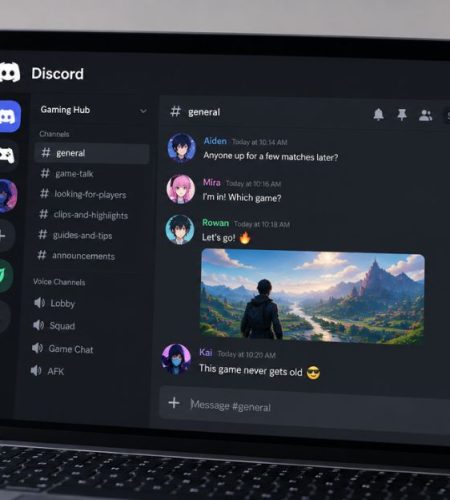
For gamers, Discord is more than a place to talk after a match. It can be where friends decide what to play, teammates organize sessions, communities share updates, and players find people with the same interests.
That makes Discord an important part of the wider gaming experience. Whether someone is looking for a competitive squad, a casual group, or simply a place to talk about games, the platform offers plenty of ways to get involved. The wider gaming world also includes platforms and services such as SpinPlus Game, but Discord plays a different role by focusing heavily on communication and community.
Why Do Gamers Use Discord?
The biggest reason is simple: it makes staying connected with other players easy.
A game may have its own voice or text chat, but Discord gives players a separate place to keep their conversations going. A group can have dedicated text channels, voice channels, and spaces for sharing clips or discussing updates.
For example, a group of friends might use one server to:
- Find people to play with
- Talk while playing
- Share screenshots and clips
- Discuss new updates
- Organize gaming sessions
- Recommend games to each other
- Hang out when they’re not playing
Discord’s Community Guidelines specifically describe the platform as a place for people to connect around gaming through voice, video, and text.
How Do Gamers Find Discord Communities?

Finding a useful server doesn’t necessarily mean joining the biggest one you can find.
Many gamers discover communities through friends, game developers, creators, social media, and other gaming communities. Official game communities can be particularly useful because they give players a place to follow announcements and interact with other people interested in the same title.
Discord has also been expanding its role in game discovery. In 2026, Discord said there were more than 10,000 game communities on the platform with more than 80 million members as of December 31, 2025.
You can also find Discord communities through:
- Friends and existing gaming groups
- Official game websites
- YouTube and Twitch creators
- Reddit and other gaming forums
- Esports teams and communities
- Social media pages
When joining a new server, it is worth checking whether the community is actually active. A smaller server where people regularly talk can be more useful than a huge server filled mostly with inactive accounts.
What Do Gamers Actually Do on Discord?
Discord gaming communities can be used in several different ways.
Talk While Playing
Voice channels are one of the simplest ways to use Discord. Friends can join the same channel and talk while playing without relying entirely on in-game communication.
This can be particularly useful for games where teammates need to coordinate quickly.
Find Teammates
Not everyone has a regular group to play with. Gaming servers can make it easier to find people who are online and interested in playing the same game.
A dedicated channel for finding teammates can turn a simple Discord server into a regular meeting place for players.
Share Clips and Screenshots
Gaming conversations don’t have to stop when a match ends.
Players can share funny moments, impressive plays, screenshots, builds, guides, and other game-related content. Over time, these conversations can become a major part of a community.
Organize Gaming Sessions
A Discord server can also act as a simple planning space.
Members can decide when to play, choose a game, organize tournaments, or let others know when they’re available.
Hang Out Between Games
Perhaps the most important part is that Discord doesn’t disappear when the game does.
People can stay in voice channels, discuss other games, share videos, or simply chat with friends. That’s one reason gaming communities can remain active even when members aren’t playing the same title.
Discord Gaming for Different Types of Players
Not every gamer uses Discord in the same way.
Competitive players may use it for team communication, practice sessions, recruitment, and strategy discussions.
Casual players might mainly use Discord to talk with friends and find someone to play with.
RPG and MMO players can use communities to discuss builds, quests, guilds, raids, and updates.
Mobile gamers can use Discord to stay connected with their squads outside the game itself.
Streamers and creators often use Discord to give their audiences a place to interact beyond their videos or livestreams.
Esports fans can join communities around teams, tournaments, and individual games.
There isn’t one correct way to use Discord for gaming. The community usually shapes how the server works.
Your Discord Profile Is Part of Your Gaming Identity
Once you start joining gaming communities, your profile becomes part of how people recognize you.
Your username is important, but your profile picture can be just as noticeable. Some gamers use characters from their favorite games, while others choose anime artwork, memes, custom designs, or matching PFPs with their friends.
Your profile doesn’t need to be complicated. A recognizable PFP that fits your personality or favorite games can be enough to give your Discord account its own identity.
For groups that want a more coordinated look, matching profile pictures can also become part of the squad’s identity.
Discord Activity Makes Gaming More Social
Discord can show your gaming activity to other people when activity sharing is enabled.
Depending on the game and platform, Discord can display information about games you’re playing, and games that support Rich Presence can show additional details. You can control who can see your activity through Discord’s activity-sharing settings.
This creates a simple way for friends to see what others are doing without having to ask every time.
For example, you might notice that a friend has started playing a game you’ve been meaning to try. Instead of sending a separate message asking what they’re doing, the activity information can provide that context directly.
Some games also integrate Discord-powered features more deeply. Depending on the game, these integrations can include things such as friends lists, messaging, voice features, account linking, and game invitations.
How to Get Started With Discord Gaming
If you’re completely new to Discord, you don’t need to learn every feature before joining a gaming community.
Start with the basics:
- Create or log into your Discord account.
- Join a gaming server.
- Read the server rules and introduction channels.
- Explore the text channels.
- Join a voice channel when you’re comfortable.
- Add friends or teammates you regularly play with.
- Adjust your notification and activity-sharing settings.
If you prefer learning by watching someone go through the interface, this Discord tutorial by Think Tutorial can help you get familiar with the basics.
What Makes a Good Gaming Discord Server?
A large member count doesn’t automatically make a server useful.
When deciding whether to stay in a community, look at how active the conversations are and whether the people there actually share your interests.
A good gaming server will usually have:
- Clear rules
- Organized channels
- Active conversations
- Reasonably effective moderation
- Channels for the games you care about
- A community that fits your interests
You also don’t need to join dozens of servers. A few active communities that you genuinely enjoy can be much easier to keep up with.
Stay Safe in Gaming Communities
Discord brings together people who may have never met each other outside the platform, so basic online safety still matters.
Don’t share passwords, private account information, your home address, or other sensitive details with people you don’t know. Be careful with unexpected links and downloads, particularly when someone sends you something without explaining what it is.
It’s also worth reviewing your privacy and activity settings. Discord provides controls for deciding whether your activity is shared globally, with particular servers, or with specific connections.
Why Discord Fits Gaming So Well
Gaming is increasingly social, and Discord sits naturally between the game and the community around it.
A player might discover a game through a friend, join a Discord server, find teammates there, talk about an update, share a clip, and then move on to another game with the same group. The individual game changes, but the community can stay together.
Discord itself describes this as a social layer around gaming, and its recent updates continue to focus on helping players discover games, connect with friends, and interact with game communities.
That is ultimately what makes Discord useful for gamers. It isn’t just somewhere to talk while playing. For many groups, it becomes the place where the gaming community exists in the first place.
Final Thoughts
Discord gives gamers a simple way to find people, communicate, organize sessions, and stay connected outside individual games.
You don’t need a huge server or an elaborate setup to get started. Find a community around the games you enjoy, spend some time getting familiar with it, and build your own circle from there.
And as your gaming community grows, your Discord profile can become part of that identity too—from your username and PFP to the way you participate in the communities you join.
For profile customization, you can also explore our guides on Discord profile picture size, how to change your Discord profile picture, and Discord bio ideas.
If you’re interested in creating an AI-based profile image, see our guide on how to make a Discord PFP with AI. For a more visual profile, our guide to creating aesthetic PFPs for Discord can help you choose a consistent style.
Comments